Unlimited Usernames: One Subscription, Every Platform

Most content creators don’t use just one platform. You’re probably on OnlyFans and TikTok, maybe Fansly too, with a Discord server on the side and a YouTube channel for good measure. Each account has its own username, its own audience, and its own piracy risk.
With CopyrightShark, you add unlimited usernames across 100+ platforms under a single subscription. No per-username charges. No caps. No pricing tiers that lock you out of protecting your second, third, or fifteenth account.
Every username you add gets the same 24/7 scanning, unlimited DMCA takedowns, and content removal coverage as part of our DMCA takedown service.
What are unlimited usernames?
Short version: one CopyrightShark subscription covers all your accounts. You can add every username you use across every platform you’re on, and they all get scanned and protected equally.
That might sound obvious, but it’s not how most content protection services work. Many charge per username or cap the number of accounts you can monitor on lower-tier plans. If you’re on three platforms, that’s three usernames. Five platforms? Five charges. It adds up fast, especially for creators who are active on both NSFW and SFW platforms.
With CopyrightShark, content protection across multiple platforms is built into the plan from day one. You’re not paying extra for your Fansly username because you already registered your OnlyFans. You’re not deciding which accounts “matter enough” to protect.
Add them all. Mix NSFW subscription sites with public social media accounts. The system treats them equally. Same scanning frequency, same automated takedowns, same coverage.
One subscription, one creator, unlimited brands. That’s how it should work.
Every platform, one subscription
CopyrightShark works as a multi-platform DMCA service, covering subscription platforms, social media, video, livestreaming, cam sites, audio, courses, art, 3D printing marketplaces, software distribution, and more.
100+ Supported Platforms
 4Based
  500px
500px  AdmireMe.VIP
  Apple Podcasts
  ArtStation
  Audible
  Bandcamp
  beehiiv
  Behance
  Bilibili
  Bluesky
  BongaCams
  Buy Me a Coffee
  Cam4
Cam4  Camsoda
  CGTrader
  Chaturbate
  Chrome Web Store
  Clips4Sale
  CodeCanyon
  Creality Cloud
  Cults3D
  Dailymotion
  DeviantArt
  Discord
  Dribbble
  Epic Games Store
  Etsy
Etsy  Fab
Fab  Facebook
  FanCentro
  Fanfix
  Fansly
  Fanvue
  Ghost
Ghost  GitHub
  Gumroad
  Instagram
  IsMyGirl
  itch.io
  JustForFans
  Kajabi
  Amazon KDP
  Kick
Kick  Ko-fi
Ko-fi  LinkedIn
  LiveJasmin
  LoyalFans
  MakerWorld
  ManyVids
  Mastodon
  Medium
  ModelCentro
  MyFreeCams
  Mym
Mym  MyMiniFactory
  Nebula
  OnlyFans
  Passes
  Patreon
  Pinterest
  Pixiv
Pixiv  Pornhub
  Printables
  Reddit
  Roblox
  Rumble
  Skillshare
  Skool
Skool  Snapchat
  SoundCloud
  Spotify
  Steam
Steam  Streamate
  Stripchat
  Subs
Subs  Substack
  Teachable
  Telegram
  Thangs
  ThemeForest
  Thingiverse
  Thinkific
  Threads
  TikTok
  TurboSquid
  Twitch
  Twitter/X
  Udemy
Udemy  Unity Asset Store
  Unreal Marketplace
  Vimeo
Vimeo  Wattpad
  WordPress.org
  YouTube
 Platform not here? You can add any site, app, or your own domain/platform.
The platform list keeps growing. But the part that actually matters: if your platform isn’t on this list, you can still add it. The “Other / Custom” option lets you register any platform manually, so you’re never waiting on us to support your niche marketplace or new site.
A rough breakdown of what’s covered out of the box:
- Subscription platforms: OnlyFans, Fansly, Patreon, Fanvue, ManyVids, JustForFans, and others
- Social media: TikTok, Instagram, Twitter/X, Reddit, Snapchat, Bluesky, Threads
- Video and streaming: YouTube, Twitch, Kick, Vimeo, Rumble, Bilibili
- Cam sites: Chaturbate, Stripchat, LiveJasmin, BongaCams, MyFreeCams, and more
- Audio: Spotify, SoundCloud, Bandcamp, Apple Podcasts, Audible
- Courses: Udemy, Skillshare, Teachable, Thinkific, Kajabi
- Art and design: Behance, DeviantArt, ArtStation, Pixiv, Dribbble, 500px
- 3D printing: Printables, Thingiverse, Cults3D, MakerWorld, Thangs, CGTrader
- Software: GitHub, WordPress.org, ThemeForest, Chrome Web Store, Unity Asset Store
- Other: Ko-fi, Buy Me a Coffee, Gumroad, Substack, Medium, Steam, itch.io
How to add a username
Adding a new username takes about 30 seconds:
- Open the Brand Manager in your CopyrightShark dashboard
- Select a platform from the dropdown menu (all platforms are listed alphabetically)
- Enter your username or handle for that platform. Some platforms use different labels here. YouTube, for example, asks for your “Channel Name” instead of “Username”
- Save. Your username is now being scanned and protected
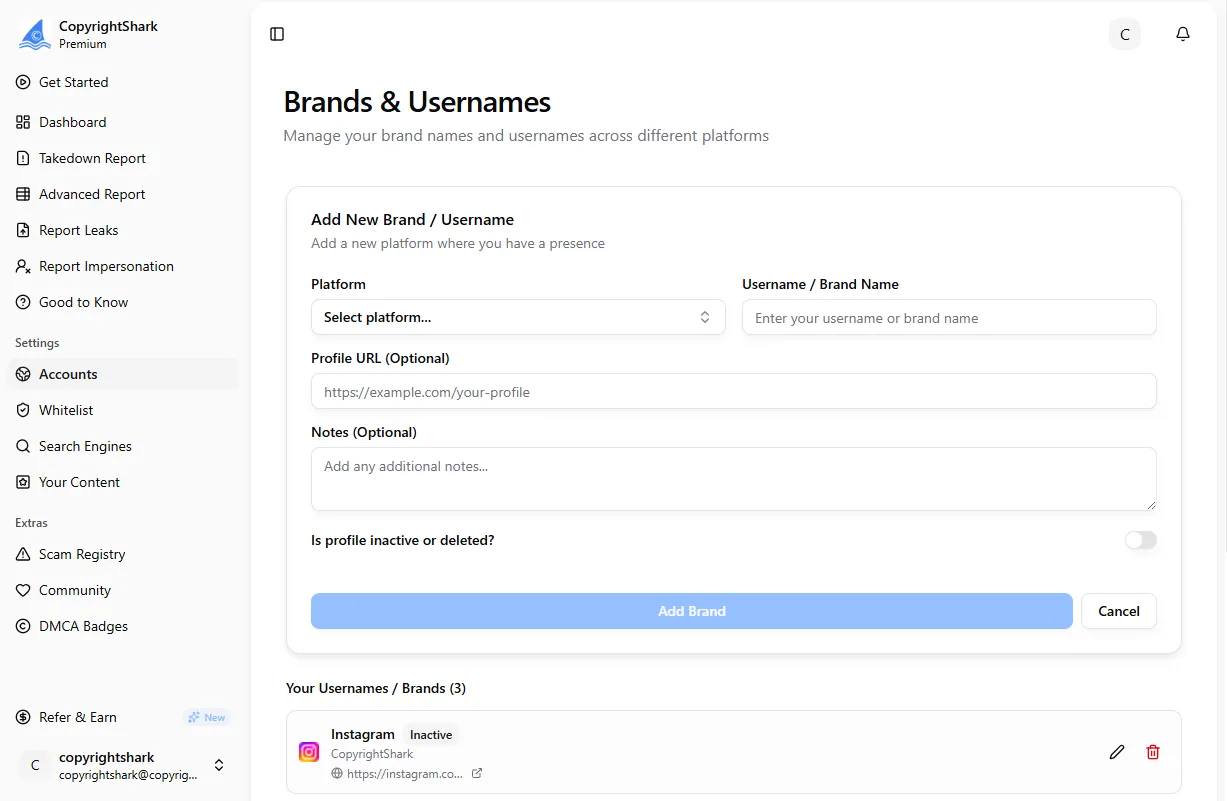
You can repeat this as many times as you need. There’s no confirmation step, no “are you sure you want to add another one?” prompt. Just pick the platform, type the name, save. Done.
Adding custom platforms
Not every platform is in the standard dropdown, and that’s fine. Maybe you sell presets on a niche marketplace, or you’ve got content on a regional platform that most services haven’t heard of. The custom platform flow handles this.
- Select “Other / Custom” from the platform dropdown
- Type the platform name, whatever you call it
- Enter your username or handle on that platform
- Optionally add a profile URL. A direct link to your profile helps our team verify and process faster
- Save. CopyrightShark now monitors this custom platform for your content
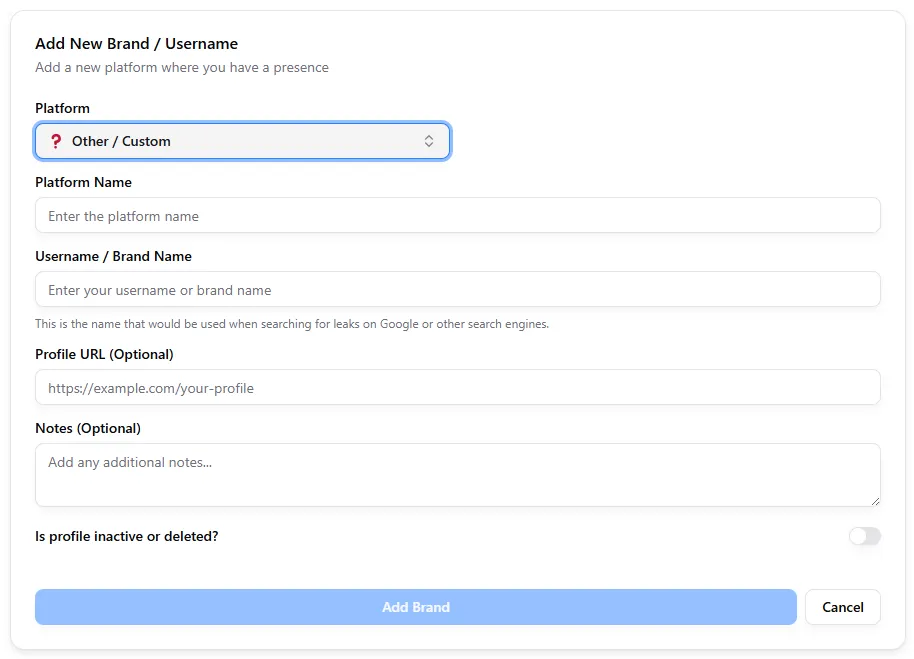
There’s no limit on how many custom platforms you can add. If you’re on ten niche sites that aren’t in the standard list, add all ten. They get the same protection as the standard platforms.
Who benefits from unlimited usernames?
Honestly, almost any creator who uses more than one platform. But some use cases stand out more than others.
Multi-platform NSFW creators are the most obvious fit. If you’re on OnlyFans and Fansly for subscriptions, Instagram and Twitter/X for promotion, and maybe a Telegram or Discord for your community, that’s five or six usernames right there. Content leaked from any one of those accounts can end up on piracy sites like Coomer or SimpCity. You need all of them monitored, not just the one you consider your “main” platform.
Course creators juggling Udemy, Skillshare, YouTube, and Teachable face a similar problem. Pirated courses get re-uploaded constantly, and protecting just one storefront leaves the others exposed.
3D artists and makers selling on Printables, Thingiverse, Cults3D, and MakerWorld deal with STL file theft across multiple marketplaces. One design gets ripped and uploaded everywhere, and knockoff sellers often use TikTok to market stolen designs.
Musicians and podcasters distributing through Spotify, SoundCloud, Apple Podcasts, and Bandcamp need to protect all creator accounts where their content lives, not just the platform with the most listeners.
Artists and designers on Behance, DeviantArt, ArtStation, and Pixiv face constant image theft. Protecting one portfolio while ignoring the others doesn’t make sense.
Agencies managing 10+ creators get the most out of unlimited usernames. Each creator might have four or five accounts. Without unlimited usernames, you’re looking at dozens of extra charges. With CopyrightShark’s agency plans, every creator gets unlimited usernames under the agency dashboard, separated by a Creator Key for clean organization.
Protect every account, every platform
Managing your brands
Once you’ve added usernames, the Brand Manager gives you a few extra tools to keep things organized.
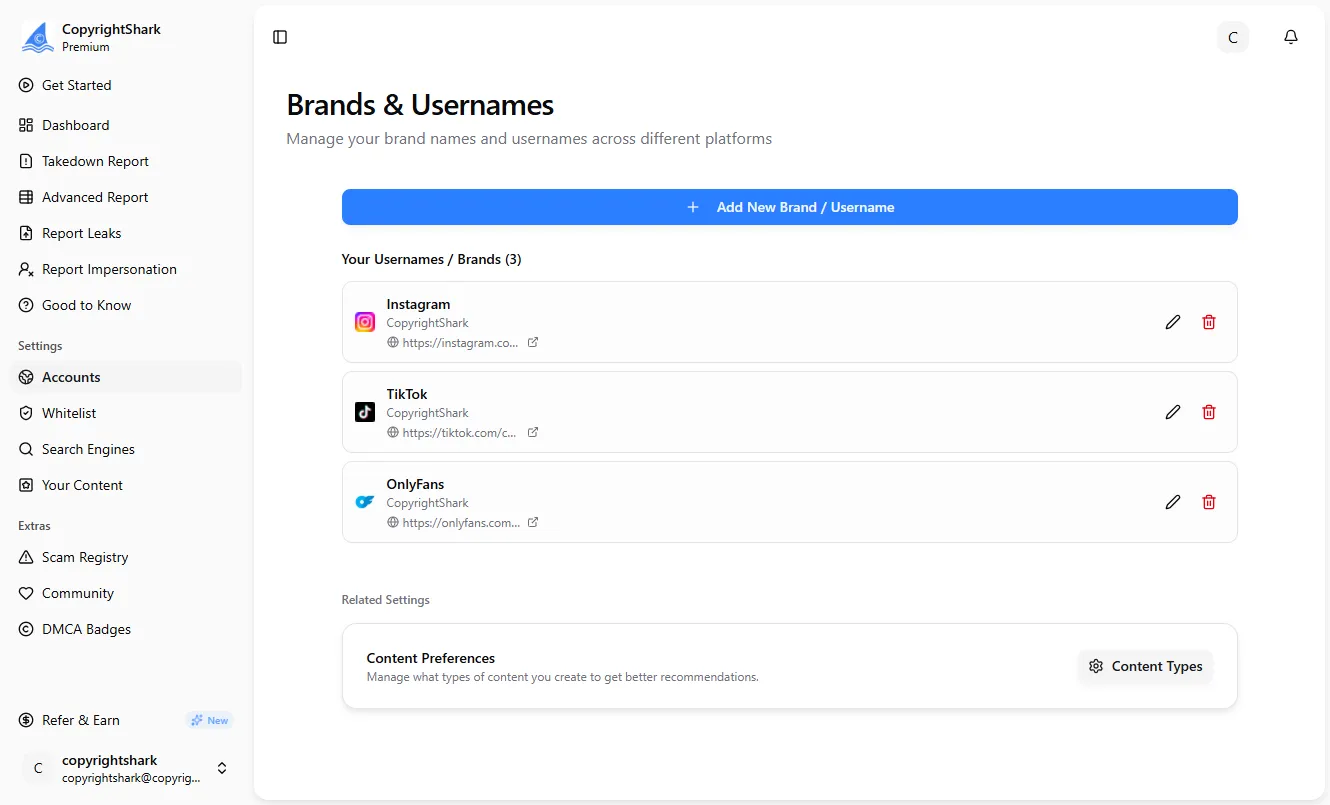
Profile URL. You can add a direct link to your profile on each platform. This is optional, but it helps our scanning engine find and verify your content faster. Useful if your username on one platform doesn’t match another.
Notes. A free-text field for anything you want to remember about that brand. Maybe it’s “backup account” or “collab account with @someone” or “inactive but don’t delete.” It’s your space.
Inactive toggle. If you stop using a platform temporarily, you can mark that username as inactive. Scanning pauses immediately, and you can reactivate it whenever you want. No need to delete and re-add, just flip the toggle.
Agency Creator Key. For agency plans only. This field connects each username to a specific creator within your agency. It keeps reporting clean and makes it easy to see which takedowns belong to which creator.
Frequently asked questions
- Is there a limit on how many usernames I can add?
- No. All CopyrightShark plans include unlimited usernames for one creator or brand. You can add as many as you need across any combination of platforms.
- Do all my usernames get the same level of protection?
- Yes. Every username you add receives equal 24/7 scanning and automated DMCA takedowns. There's no tiered protection based on how many accounts you have.
- What if my platform isn't in the standard list?
- Use the "Other / Custom" option to add any platform manually. Enter the platform name, your username, and optionally a profile URL. Custom platforms get the same protection as standard ones.
- Can I temporarily pause protection for one username?
- Yes. The inactive toggle lets you pause scanning for any username instantly. Reactivate it whenever you're ready, no need to delete and re-add.
- How does this work for agencies managing multiple creators?
- Agency plans use the Creator Key field to separate creators while managing all usernames from one dashboard. Each creator gets their own unlimited usernames.
- Can I mix NSFW and SFW platforms under one account?
- Yes. There are no restrictions on platform types. Add OnlyFans, YouTube, Patreon, TikTok, and any other combination freely under one subscription.